You might be considering Webflow as your web building platform of choice, but their pricing makes you scratch your head. You're not alone. Webflow's plan structure has always been one of the more complex parts of adopting the platform.
Quick heads-up: Webflow updated its pricing and simplified its plan lineup in May 2026. The CMS and Business site plans are gone. They've been merged into a single new Premium plan. A new Team plan has been added for growing teams. And AI credits are now included in every Workspace plan. This article reflects those changes.
As a Webflow Premium Partner and consulting firm, we've helped dozens of B2B companies choose the right plan for their goals. Here's everything you need to know, explained clearly.
If still in doubt, don’t hesitate to reach out. Someone at Foursets will surely help you. Most likely, it will be Nick the CEO.
What Changed in May 2026
Webflow rolled out a major pricing update on May 13, 2026 [2]. Here's what changed.

Webflow's community team put it plainly:
"We've heard from customers that they need better ways to scale and that our plans have been harder to navigate than they should be."
— Mary Findley, Admin, Webflow Community [4]
Four things changed:
1. The CMS and Business site plans were merged into one Premium plan.
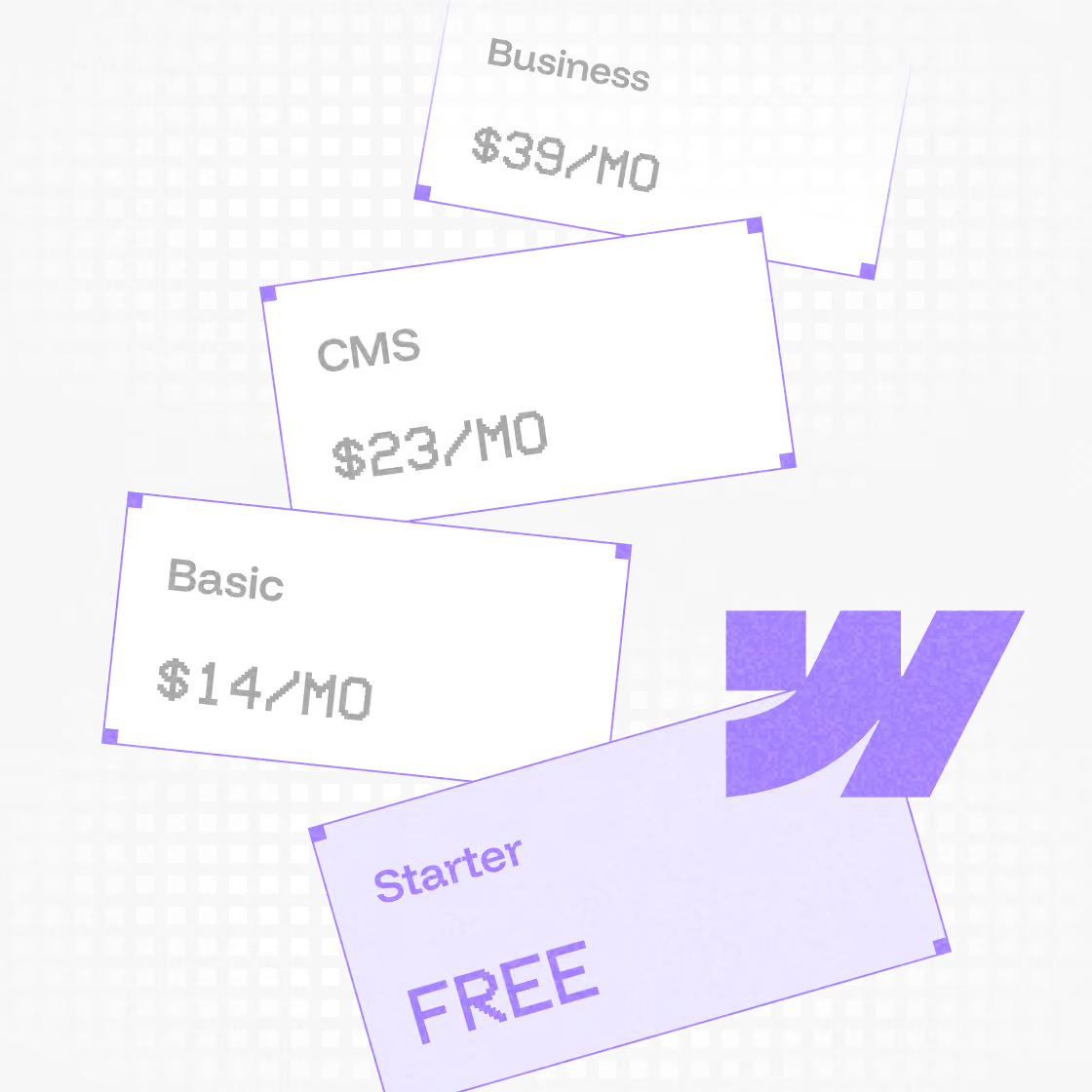
Instead of choosing between CMS ($23/mo) and Business ($39/mo), there's now a single Premium plan at $25/mo (annual). It includes 20,000 CMS items [2], which means most users won't need add-ons anymore.

2. The Basic site plan got a small price increase and a page limit increase.
Annual Webflow price went from $14/mo to $15/mo. Monthly price went from $18/mo to $25/mo. Static page limit doubled from 150 to 300 [2].
3. A new Team plan launched at $2,500/mo (annual only).
This is a bridge between self-serve and Enterprise. It includes 10 seats, Localization, AEO agents, and page branching. Designed for teams of 5 to 15 people who've outgrown the Premium plan [2].
4. AI credits are now included in all Workspace plans.
Every Workspace plan now includes a monthly AI credit allocation. No enforcement until June 29, 2026 [2][3], so you can explore usage patterns before limits kick in.
When do changes take effect?
| Date | What happens |
|---|---|
| May 13, 2026 | Site plan changes live for new purchases. Team plan available. AI credits added to all Workspace plans and AI usage dashboard live. |
| June 29, 2026 | Site plan changes take effect for existing sites (excluding sites in Freelancer or Agency Workspaces, or sites on legacy pricing). AI credit limits enforced. |
| November 16, 2026 | Rollout reaches the remaining sites: Freelancer and Agency Workspace sites, and any site on legacy pricing. |
Rollout timeline based on your account type, Workspace, and Site plan. Source: [3]
If you want to lock in your current pricing for another year, switch to annual billing before your renewal date [3].
Want to see exactly how your bill changes? Webflow built a Pricing Change Calculator for this [5].
Reasons to Use Webflow
Before diving into the pricing, let's be clear on what you're actually paying for.
🟣 No-Code Flexibility with Customization
Webflow gives non-developers full control over design through a visual editor. You can still add custom HTML, CSS, and JavaScript when you need it. It's the best of both worlds: accessible to marketers, extensible for developers.
🟣 Built-In CMS for Dynamic Content
The Webflow CMS lets marketing teams manage content without a developer. No plugins. No WordPress admin nightmares. You control the structure, they control the content.
🟣 Superior Performance & SEO Optimization
Webflow hosts on Amazon CloudFront and Fastly CDN [1]. Your site will also have a SEO-friendly structure with clean HTML, meta tags, schema markup, alt text, automatic sitemaps and all the trimmings. You get everything Google wants without patching it together manually.
🟣 Scalable for Businesses & Teams
Site Plans and Workspace Plans are designed to grow with you. A solo founder starts on a free plan. An enterprise team gets custom everything.
🟣 Integrated Ecommerce Capabilities
Webflow's ecommerce plans let you build a fully custom checkout experience. Full design control, no forced templates.
🟣 Reduced Total Cost of Webflow Site Ownership
No plugin dependencies. No separate hosting fees. No surprise update that breaks your site at 2am before a product launch. Webflow bundles everything.
🟣 Security & Hosting Without Headaches
Enterprise-grade hosting, free SSL, and automatic backups come standard. Even on the free plan [1].
🟣 A Future-Proof Solution
Webflow empowers marketing teams to move fast without engineering tickets. That's why companies move to it.
Related: The Pros and Cons of Webflow
Understanding the Webflow Plan Types
Now, let’s break down the various Webflow pricing plans — Site plans (further divided into General and Ecommerce), Workspace plans and optional add-ons that come with their own pricing.
1. Site Plans (General)
Site plans determine what your published website can do: custom domain, bandwidth, CMS, ecommerce. You pay per site. As of May 2026, there are five tiers [1]:
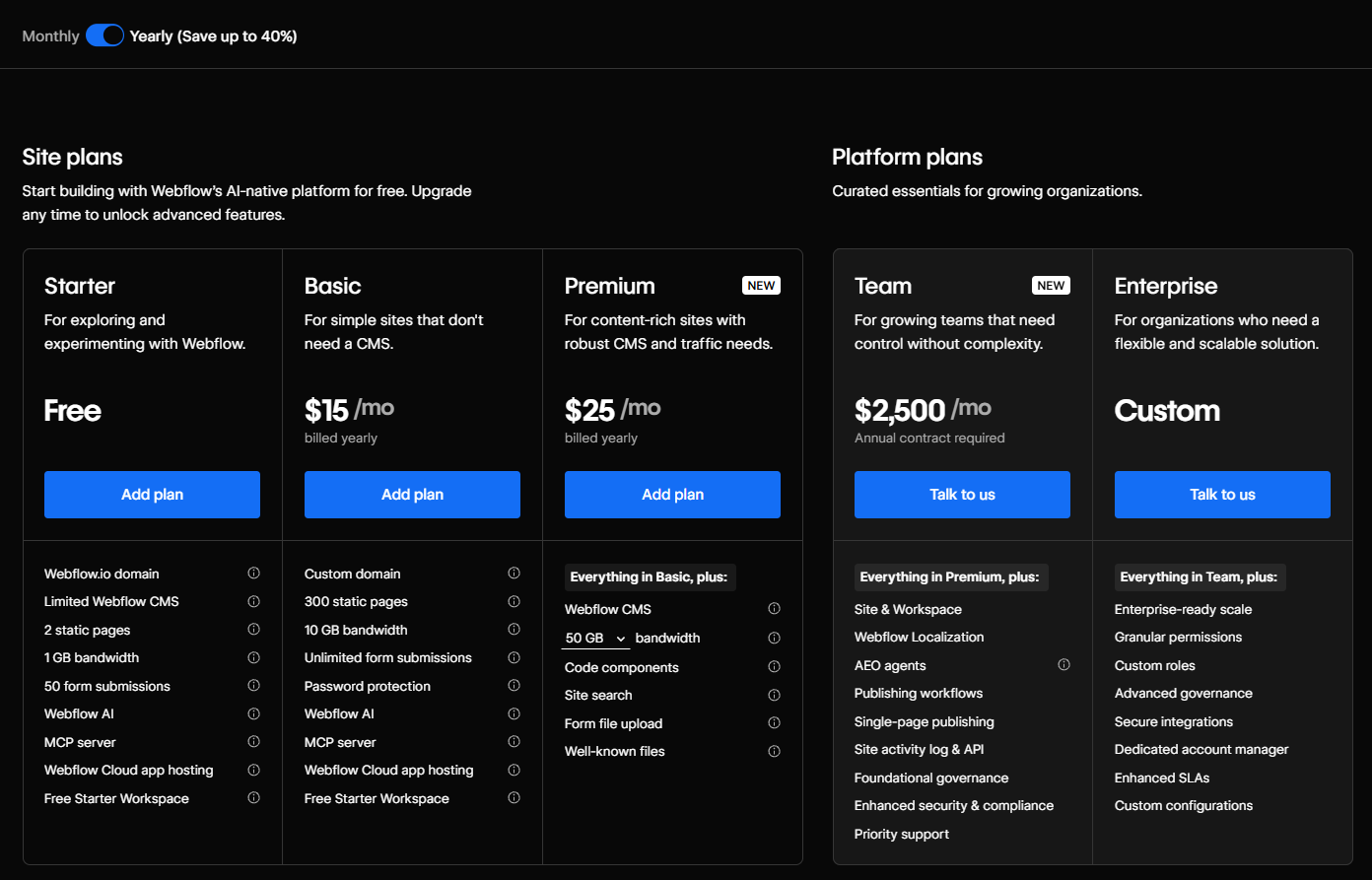
- Starter: Free. A webflow.io subdomain, 2 static pages, 50 CMS items, 1 GB bandwidth. For testing only.
- Basic: $15/mo (annual), $25/mo (monthly). For static sites without a CMS. Custom domain, 300 static pages, 10 GB bandwidth.
- Premium: $25/mo (annual), $39/mo (monthly). The CMS-powered plan. Introduced in May 2026, replacing the old CMS and Business plans [2]. Full CMS, 20,000 CMS items, 50 GB bandwidth (expandable via add-on).
- Team: $2,500/mo (annual). New in May 2026 [2]. For organizations needing enterprise-grade controls without a full custom contract. 5 full seats included, 99.00% uptime SLA, publishing workflows, page branching, and 5x higher API rate limits (600 RPM vs 120 RPM on Premium) [1].
- Enterprise: Custom pricing. Contact Webflow. For companies with advanced governance, security, compliance, or infrastructure requirements.
2. Ecommerce Plans
If you're selling products online, you need an Ecommerce plan instead of a General site plan.
There are three [1]:
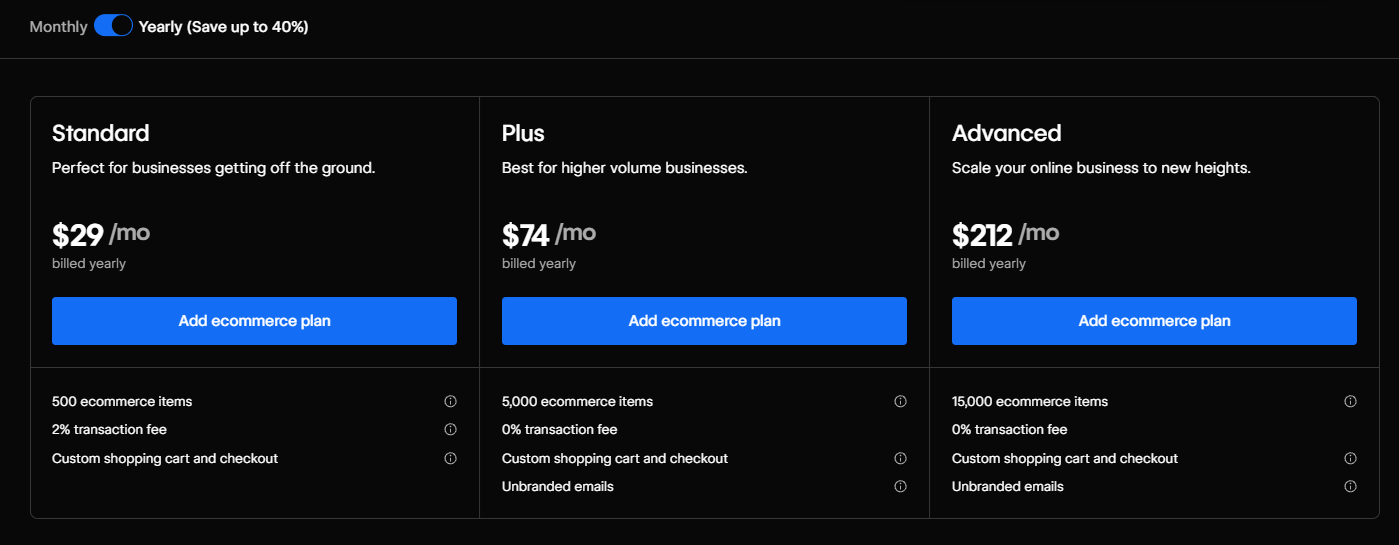
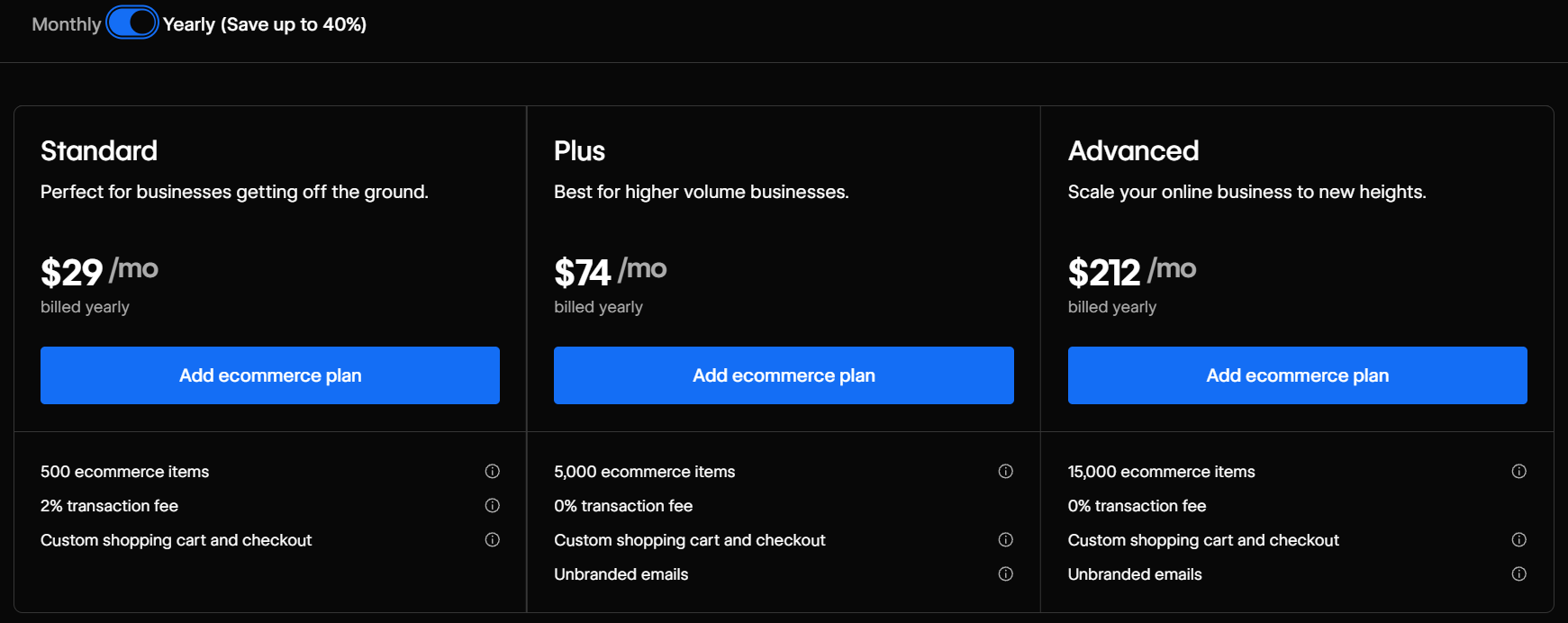
- Standard: $29/mo (annual), $42/mo (monthly). Entry-level. Up to 500 ecommerce items, 2% transaction fee.
- Plus: $74/mo (annual), $84/mo (monthly). No transaction fees. Up to 5,000 ecommerce items, 10 staff accounts.
- Advanced: $212/mo (annual), $235/mo (monthly). Up to 15,000 ecommerce items, 15 staff accounts, no transaction fees.
Webflow Ecommerce pricing plans were not changed in the May 2026 update [2].
3. Workspace Plans
Workspace plans control your working environment: how many projects you can build simultaneously, how many team members can collaborate, and what tools you have access to. These are billed separately from Site plans.
Webflow offers two tracks [1]:
For In-House Teams:
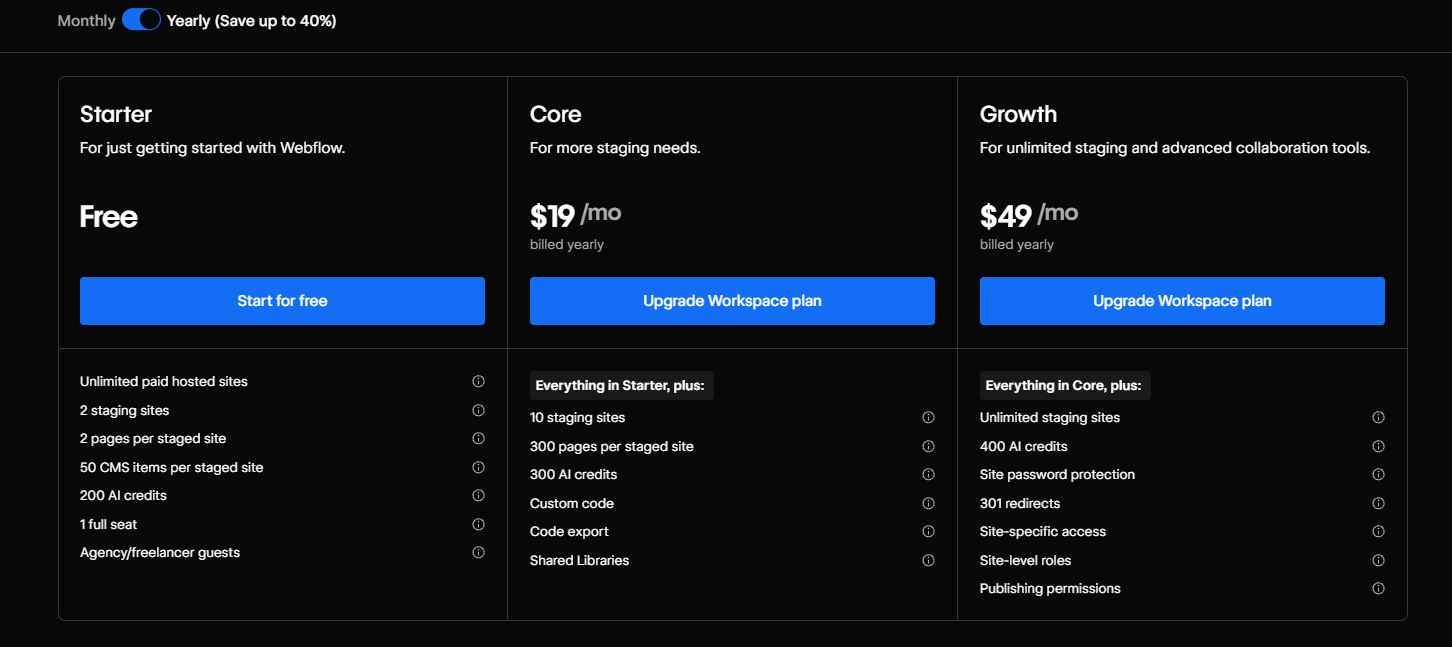
- Starter: Free. 2 staging sites, 200 AI credits/mo [1][2].
- Core: $19/mo (annual), $28/mo (monthly). 10 staging sites, code export, 300 AI credits/mo [1][2].
- Growth: $49/mo (annual), $60/mo (monthly). Unlimited staging sites, publishing permissions, role assignment, 400 AI credits/mo [1][2].
For Freelancers and Agencies:
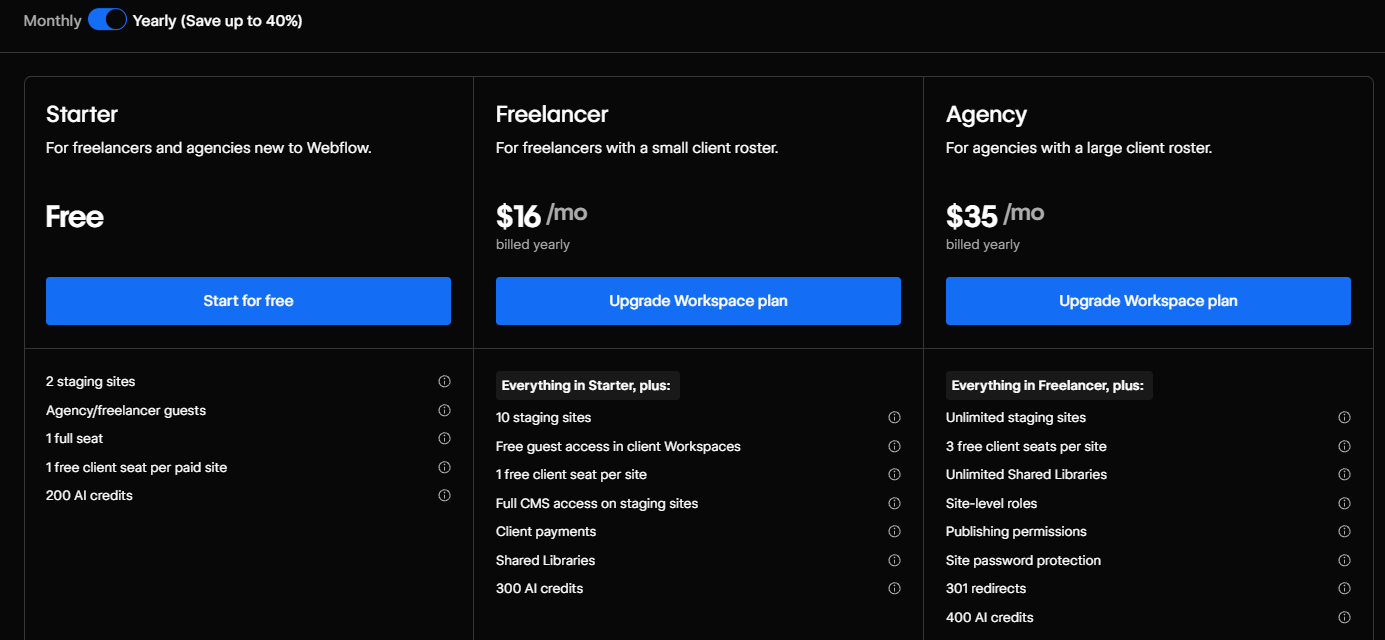
- Starter: Free. 2 staging sites, 200 AI credits/mo [1][2].
- Freelancer: $16/mo (annual), $24/mo (monthly). 10 staging sites, site transfer capability, free client guest access, 300 AI credits/mo [1][2].
- Agency: $35/mo (annual), $42/mo (monthly). Unlimited staging sites, 3 free client seats per site, publishing permissions, 400 AI credits/mo [1][2].
AI credits are new across all Workspace plans starting May 2026 [2].
Comparing Site Plans and Workspace Plans
Site Plans apply to individual websites and unlock site-specific features: custom domain publishing, CMS capabilities, advanced SEO controls, custom code, and ecommerce functionality. They determine what your published website can do.
Workspace Plans operate at the account level and provide tools for managing multiple projects within Webflow. A paid Workspace Plan enables enhanced staging capabilities, collaboration features, and code export. These plans are especially valuable for teams and agencies managing multiple client projects.
A Site Plan is required to publish a site to a custom domain. A paid Workspace Plan is what you need to collaborate with others, export code, or manage several projects in one environment.
When you only need a Site Plan: You already have a workspace set up and just need to publish a site on a custom domain. Common for solo creators or clients who manage their own hosting while an agency handles the build.
When you only need a Workspace Plan: You're building client sites and the clients manage their own Site Plan subscriptions. Agencies often operate this way — they own the workspace, clients own the published site plans.
When you need both: Most in-house marketing teams and growing agencies need both. The Workspace Plan covers your ability to build and collaborate. The Site Plan covers what your published site can do. They serve different purposes and are billed separately.
Webflow Website Pricing In Detail: Site Plans
Site plans determine what your published website can do. There are now five tiers: Starter, Basic, Premium, Team, and Enterprise [1].
The old CMS and Business plans no longer exist. They've been combined into the new Premium plan [2].
🟩 Webflow Starter Plan (free)
Price: Free [1]
Webflow Starter plan is Webflow's free tier. It gives you a webflow.io subdomain, 2 static pages, limited Webflow CMS access (50 CMS items, 20 CMS Collections), and 50 form submissions [1]. You get 1 GB of bandwidth [1].
It's useful for testing the platform. It's not useful for a real website. The moment you need a custom domain or more than two pages, you move up.
What's new in May 2026: The Starter plan now includes access to Webflow AI and the Webflow MCP server [1]. These were previously unavailable on free plans.
Who it's for: Developers and marketers evaluating Webflow before committing. That's it.
🟩 Webflow Basic Plan
Price: $15/mo (annual), $25/mo (monthly) [1]
Webflow Basic plan is for static sites that don't need a CMS. You get a custom domain, 300 static pages (doubled from 150 in May 2026 [2]), 10 GB bandwidth [1], unlimited form submissions, password protection, Webflow AI, and MCP server [1].
What it does not include: a CMS. If your site has a blog, dynamic content, or any content that needs to be updated by a non-developer, Basic is the wrong plan.
What changed in May 2026: Price increased from $14 to $15/mo (annual) and from $18 to $25/mo (monthly) [2]. Page limit doubled from 150 to 300 [2].
Who it's for: Static marketing sites, landing pages, and portfolio sites that don't need a CMS. If your content rarely changes and you don't need a content editor or dynamic pages, this is the most affordable paid site plan.
🟩 Webflow Premium Site Plan
Price: $25/mo (annual), $39/mo (monthly) [1]
The Premium plan is new as of May 2026. It replaces both the old Webflow CMS plan ($23/mo) and the old Webflow Business plan ($39/mo), combining them into one [2].
What's included [1]:
- Custom domain
- Full Webflow CMS access
- 40 CMS Collections
- 20,000 CMS items (enough for most content-heavy sites without add-ons)
- 50 GB bandwidth (with add-on options available)
- Unlimited form submissions
- Form file upload
- Well-known files
- Password protection (site and page-level)
- Site search
- Webflow AI
- Faster search indexing [3]
What this means for former CMS users: Your plan price increases to $25/mo (annual) [3], gaining 18,000 more CMS items and double the static pages [3]. Most CMS users will pay slightly more but get significantly more capacity.
What this means for former Business users: You're moving from $39/mo to $25/mo (annual) [3], which is a price decrease. However, bandwidth decreases from 100 GB to 50 GB [3]. If your site relies on high bandwidth, check your usage before the change takes effect.
Note: The old Business plan had 100 GB of included bandwidth, not 500 GB as previously stated in an earlier version of this article. That was a documentation error. The current Premium plan includes 50 GB [1].
Who it's for: Blogs, content marketing sites, SaaS marketing sites, and any site where a marketing team needs to manage CMS content independently. This is the right plan for most Webflow sites.
🟩 Webflow Team Plan
Price: $2,500/mo (annual contract only) [1]
The Team plan is Webflow's new bridge between self-serve and Enterprise. It launched in May 2026 [2].
What's included [1][2]:
- 100 CMS Collections
- Up to 20,000 CMS items
- 10 seats (full and limited, mixed)
- Webflow Localization (2 locales built in)
- AEO agents
- Publishing workflows
- Page branching
- Single-page publishing
- Site activity log
- Custom SSL certificates
- Security headers
- 5x higher API rate limits than self-serve plans (600 RPM vs 120 RPM on Premium) [1]
- Up to 30 TB bandwidth
The headline feature is page branching [2]. It lets teams work on content changes in parallel without overwriting each other, which is the core workflow problem for teams managing a high-velocity marketing site.
Team vs Premium: Team costs significantly more than Premium on its own. The difference is features [1][2]: page branching, publishing workflows, 100 CMS Collections (vs 40), and Localization built in. If your team is hitting those ceilings on self-serve, Team is the path. If you're not, it isn't.
Team vs Enterprise: Team is self-serve. Enterprise is custom-quoted and includes advanced security, compliance, granular permissions, and a dedicated customer success manager [1]. If you're managing a 15+ person team or have specific governance requirements, you're Enterprise territory.
Who it's for: Marketing teams that need features Premium doesn't offer: publishing workflows, page branching, and 100 CMS Collections [2]. B2B SaaS companies scaling their content operations across multiple contributors. Teams that need Localization included without paying for it separately.
🟩Webflow Enterprise Site Plan
Price: Custom (contact Webflow) [1]
Enterprise is Webflow's top tier. It's built for companies with complex governance, security, compliance, or performance requirements.
What's included [1]:
- Everything in Team
- Custom bandwidth and CMS limits (no fixed cap — negotiated with Webflow)
- Advanced security and compliance (SSO, JIT provisioning, SCIM, audit logs API)
- Custom roles and granular permissions
- Advanced governance tools
- AEO agents and AI-native workflows
- 99.99% uptime SLA (vs 99.00% on Team)
- Dedicated customer success manager
- Priority support
- Custom API rate limits
Companies transition from self-serve Webflow to Enterprise when they outgrow the capabilities of standard plans and require greater scalability, security, governance, and support [1][9]. Primary reasons include:
Enhanced security and compliance. As businesses scale, security requirements become mandatory. Enterprise provides SSO, JIT provisioning, SCIM, and audit logs API, along with SOC 2 Type II certification and a 99.99% uptime SLA [1][9]. Critical for companies handling sensitive data or undergoing enterprise vendor reviews.
Scalable design systems and brand consistency. As teams grow, maintaining consistent branding across all digital assets becomes difficult to enforce manually. Enterprise supports shared design system libraries so all teams work from the same source of truth [9].
Governance, permissions, and publishing workflows. When multiple teams collaborate on the same site, governance becomes a bottleneck. Enterprise provides granular permissions, custom roles, workflow approvals, and page branching — preventing publishing errors and streamlining cross-team collaboration [1][9].
High-traffic performance and reliability. Enterprise runs on AWS and Cloudflare infrastructure with a 99.99% uptime SLA, global CDN delivery, and automatic traffic scaling [9]. For organizations where site downtime has direct revenue or reputational impact.
Dedicated support and strategic partnership. Self-serve plans route you to community forums and standard support tickets. Enterprise includes a dedicated Customer Success Manager, solutions architects for implementation, and 24/7 priority support [9].
Long-term scalability. Custom bandwidth, CMS limits, and API rate limits — negotiated directly with Webflow — mean organizations aren't constrained by fixed plan ceilings as they scale [1].
🟩 Ecommerce Site Plans
If you're selling products, you need an Ecommerce site plan. Standard non-ecommerce plans don't support checkout, product catalogs, or order management. You can't add ecommerce to a Premium plan. You buy an ecommerce plan instead.
Ecommerce plans are separate from regular site plans. There are three: Standard, Plus, and Advanced [1].
Note: Ecommerce plans were not part of the May 2026 pricing update [2]. Prices and features below reflect current live pricing as of May 2026 [1].
Standard Ecommerce Plan
Price: $29/mo (annual), $42/mo (monthly) [1]
The Standard ecommerce plan is the entry point for online stores. You get up to 500 ecommerce items, 150 static pages, 2,000 CMS items, and 50 GB bandwidth [1].
The key limitation: a 2% transaction fee on every sale [1]. Webflow takes 2% on top of whatever your payment processor charges.
What's included: Custom domain, custom shopping cart, custom checkout, Apple Pay and web payments support, Stripe and PayPal acceptance, 3 staff accounts, all the standard Webflow hosting features [1].
Transaction fee math: If you're selling $1,000/month, you pay $20 in Webflow transaction fees on top of your payment processor fees. At $2,250/month in sales, the Plus plan (0% fee, $74/mo) breaks even against Standard plus fees [1]. Above that, Plus saves you money. See the Transaction Fee Breakeven section below for the full calculation.
Who it's for: New online stores and small shops launching on Webflow with modest sales volume. Once your monthly sales clear $2,250, do the math on Plus.
Plus Ecommerce Plan
Price: $74/mo (annual), $84/mo (monthly) [1]
The Plus plan removes the transaction fee and raises all the limits. Up to 5,000 ecommerce items, 300 static pages, up to 20,000 CMS items, up to 2.5 TB bandwidth [1]. No Webflow transaction fees. 10 staff accounts [1].
Also included: unbranded emails (emails are Webflow-branded on Standard) [1].
Who it's for: Established stores that have validated their product and want to stop paying transaction fees. Also for stores that need more inventory capacity or higher bandwidth.
Advanced Ecommerce Plan
Price: $212/mo (annual), $235/mo (monthly) [1]
The Advanced ecommerce plan is for high-volume stores. Up to 15,000 ecommerce items, no transaction fees, up to 20,000 CMS items, 15 staff accounts [1].
Advanced offers higher limits than Plus: 3x more ecommerce items (15,000 vs 5,000) and 5 additional staff accounts (15 vs 10) [1].
Who it's for: Stores that have outgrown Plus's 5,000-item catalog limit or need more than 10 staff accounts. If you're managing a large product inventory or a bigger team, Advanced is the only Webflow ecommerce plan that goes higher.
How Features Change Across Site Plan Tiers
As you move up Webflow's Site Plan tiers, the main improvements are around CMS capacity, bandwidth, SEO capabilities, publishing features, and team collaboration [1].
Key differences by tier [1]:
- Custom domain — Starter only publishes to a free webflow.io subdomain; all paid plans support custom domains.
- Static pages — Starter is capped at 2 pages; Basic and Premium allow up to 300; Team allows up to 500.
- CMS and dynamic content — Basic has no CMS. Starter gets 50 CMS items across 20 Collections for staging. Premium unlocks 20,000 items and 40 Collections for published sites.
- Bandwidth — scales from 1 GB/mo (Starter) to 10 GB/mo (Basic), up to 2.5 TB/mo (Premium), and up to 30 TB/mo (Team).
- Form submissions — Starter is capped at 50 per site; all paid plans are unlimited.
- SEO controls (sitemap, crawler access, robots.txt & LLMs.txt, schema markup, 301 redirects) — Basic and above; some require a paid Workspace plan on Starter.
- Advanced site features (site search) — Premium and above.
- Publishing workflows and page branching — Team and Enterprise only.
| Feature | Starter | Basic | Premium | Team | Enterprise |
|---|---|---|---|---|---|
| Custom domain | ❌ | ✅ | ✅ | ✅ | ✅ |
| Static pages | 2 | 300 | 300 | 500 | Custom |
| CMS items | 50 | ❌ | 20,000 | 20,000 | Custom |
| CMS Collections | 20 | ❌ | 40 | 100 | Custom |
| Bandwidth | 1 GB/mo | 10 GB/mo | Up to 2.5 TB/mo | Up to 30 TB/mo | Custom |
| Form submissions | 50/site | Unlimited | Unlimited | Unlimited | Unlimited |
| Remove Webflow badge | ❌ | ✅ | ✅ | ✅ | ✅ |
| Custom code | ❌ | ✅ | ✅ | ✅ | ✅ |
| Site password protection | ❌ | ✅ | ✅ | ✅ | ✅ |
| Site search | ❌ | ❌ | ✅ | ✅ | ✅ |
| Improve SEO & AEO | Must have a paid Workspace plan | ✅ | ✅ | ✅ | ✅ |
| Canonical tags | ✅ | ✅ | ✅ | ✅ | ✅ |
| Sitemap controls | Must have a paid Workspace plan | ✅ | ✅ | ✅ | ✅ |
| Crawler access controls | Must have a paid Workspace plan | ✅ | ✅ | ✅ | ✅ |
| Robots.txt & LLMs.txt | Must have a paid Workspace plan | ✅ | ✅ | ✅ | ✅ |
| Schema markup support | Must have a paid Workspace plan | ✅ | ✅ | ✅ | ✅ |
| 301 redirects | ❌ | ✅ | ✅ | ✅ | ✅ |
| Localization | ❌ | Add-on | Add-on | 2 locales included | Custom |
| Page branching | ❌ | ❌ | ❌ | ✅ | ✅ |
| Publishing workflows | ❌ | ❌ | ❌ | ✅ | ✅ |
| Support | Help Center | Help Center | Help Center | 24/7 priority | 24/7 priority |
For Ecommerce Plans, these features evolve similarly, but with added parameters like ecommerce items, staff accounts and transaction fees.
Webflow Workspace Plans in Detail
Workspace Plans control your working environment, not your published sites. They determine how many projects you can work on simultaneously, how many team members can collaborate, and what tools are available [1].
You don't need a paid Workspace plan just to publish a single site. But if you're managing more than 2 projects, working with a team beyond 1 seat, or need to transfer sites to clients, a paid Workspace plan is essential.
Webflow splits Workspace Plans into two tracks: In-House Teams and Freelancers/Agencies. The plans have similar structures but different features based on how you work [1].
New in May 2026: All Workspace plans now include AI credits [2]. See the AI Credits section for details.
🟩 Workspace Plans for In-House Teams
In-house team plans are for companies managing their own websites. You're the client and the builder.
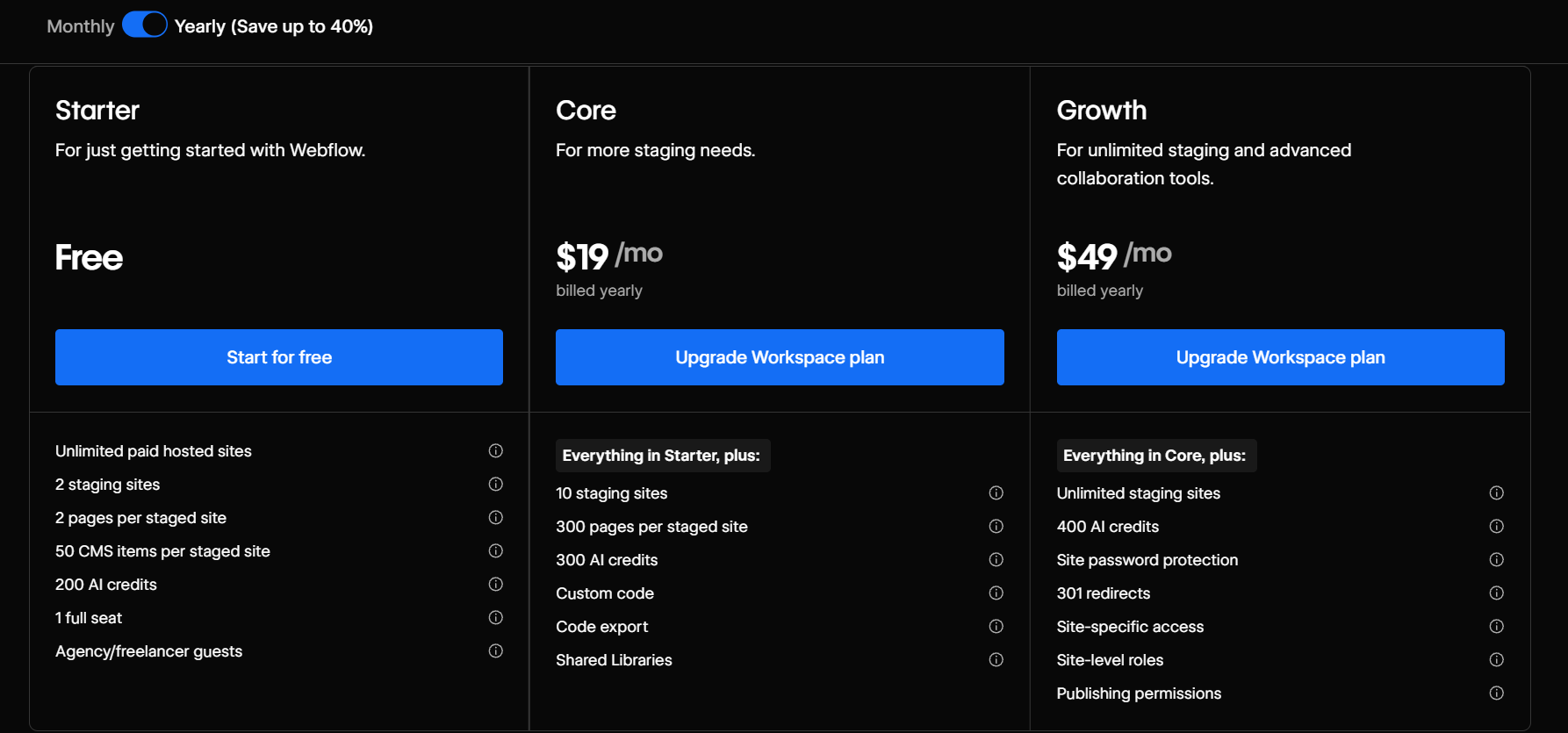
Starter Workspace
Price: Free [1]
The Starter workspace gives you 1 full seat, 2 unhosted (staging) sites, 2 pages per site, 50 CMS items per site, and the ability to invite 2 guests [1]. Also includes 200 AI credits per month [2].
It's useful for exploring Webflow before committing to a paid plan.
Core Workspace Plan
Price: $19/mo (annual), $28/mo (monthly) [1]
The Core plan gives you 1 full seat, 10 staging sites, 300 pages per site, custom code, code export, 1 shared library, and 300 AI credits per month [1][2].
Code export is the key feature. It lets you download your Webflow site's HTML, CSS, and JS for self-hosting [1]. This is only available on paid Workspace plans.
Who it's for: Solo developers and individual contributors who need to manage up to 10 projects and want code export access.
Growth Workspace Plan
Price: $49/mo (annual), $60/mo (monthly) [1]
The Growth plan is for in-house teams that manage multiple sites and need collaboration controls. Unlimited staging sites, 300 pages per site, site-specific access control, role assignment, publishing permissions, code export, site password protection, 301 redirects, shared libraries, and 400 AI credits per month [1][2].
The defining feature is publishing permissions [1]. You can control exactly who can publish to which site. That's critical for teams where multiple people have edit access but only one person should hit publish.
Who it's for: In-house marketing teams managing multiple Webflow sites who need role-based access and publishing controls.
🟩 Workspace Plans for Freelancers and Agencies
Freelancer and Agency plans are built for people managing client sites. The key difference from in-house plans: you can have unlimited staging sites and transfer sites to clients [1].
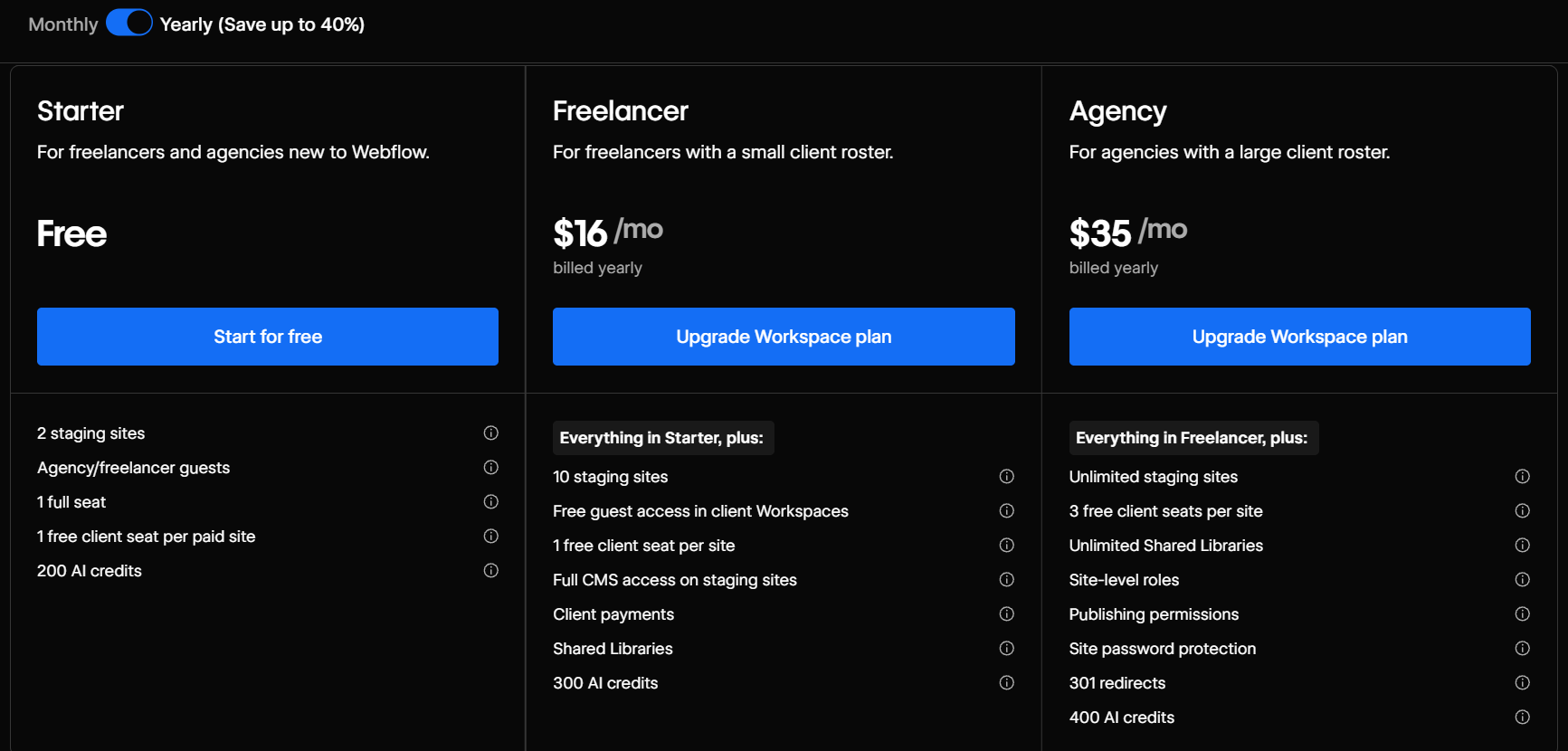
Freelancer and Agency plans are built for people managing client sites. The key difference from in-house plans: you can have unlimited staging sites and transfer sites to clients [1].
Starter Workspace
Price: Free [1]
Same as the in-house Starter. 1 full seat, 2 staging sites, 2 pages per site, 200 AI credits per month [1][2]. Fine for testing, not for real work.
Freelancer Workspace Plan
Price: $16/mo (annual), $24/mo (monthly) [1]
The Freelancer plan gives you 1 full seat, 10 staging sites, 300 pages per site, site transfer capability, code export, custom code support, 1 free client seat per site, free guest access in client Workspaces, and 300 AI credits per month [1][2].
Two separate client collaboration features are included [1]. First: each of your staging sites comes with 1 free client seat, so clients can log in and review your work without needing a paid Webflow seat. Second: when a client invites you into their own Workspace, you join as a guest at no extra cost.
Who it's for: Independent Webflow developers and designers managing a client portfolio of up to 10 active projects.
Agency Workspace Plan
Price: $35/mo (annual), $42/mo (monthly) [1]
The Agency plan gives you unlimited staging sites, 1 full seat, free guest access, full CMS access on staging, 300 pages per site, site-specific access controls, role assignment, publishing permissions, unlimited shared libraries, 3 free client seats per site, and 400 AI credits per month [1][2].
Unlimited staging sites is what makes this plan the right call for agencies with more than 10 active client projects [1]. Combined with publishing permissions and role assignment, it gives you proper governance for client work.
Who it's for: Web design and development agencies managing more than 10 active client projects, or teams that need publishing controls, role assignment, and 3 client seats per site.
Adding or Removing Seats on Workspace Plans
All paid Workspace plans support additional seats beyond the included allocation [1].
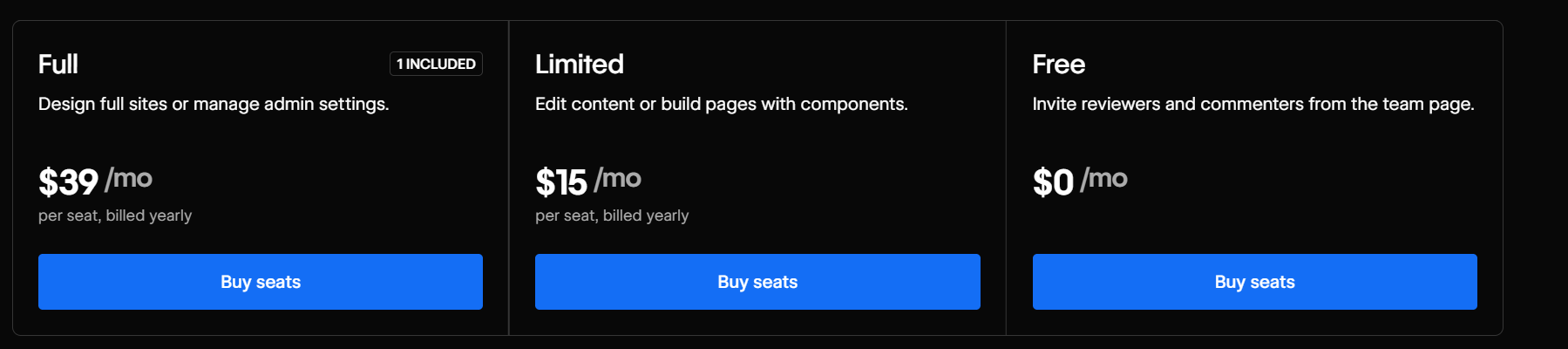
All paid Workspace plans support additional seats beyond the included allocation [1].
| Seat Type | Annual billing | Monthly billing | Can do |
|---|---|---|---|
| Full Seat | $39/mo | $45/mo | Design full sites or manage admin settings |
| Limited Seat | $15/mo | $19/mo | Edit content or build pages with components |
| Free (Reviewer) | $0 | $0 | Review and comment |
For more detailed information, refer to Webflow's official guide on adding or removing seats and managing members.
AI Credits in Every Workspace Plan
Starting May 13, 2026, every Webflow Workspace plan includes a monthly AI credit allocation [2]. This is new.
| Plan | AI Credits/Month |
|---|---|
| Starter (all types) | 200 |
| Core / Freelancer | 300 |
| Growth / Agency | 400 |
Source: [1][2]
AI credits are used for Webflow's built-in AI features: Build a site, Design sections, Generate CMS Collection items, Generate code components, Get help, Generate copy, and Improve SEO & AEO [1]. Credits reset monthly for self-serve plans and annually for Team and Enterprise plans [2].
When does enforcement start? June 29, 2026 [2]. Until then, you can use AI features freely to understand your usage patterns before limits apply.
Need more credits? An AI Credits add-on is listed as coming soon on webflow.com/pricing: 2,000 credits/mo for $20/mo, billed yearly [1].
The new AI usage dashboard in your Workspace settings shows current credit consumption so you can monitor usage before enforcement kicks in [2].
Webflow Pricing Breakdown for Optional Add-Ons
Webflow offers three optional add-ons that extend your Site plan capabilities. Each is a separate purchase on top of your base subscription and comes in a self-serve tier (fixed pricing) and an Enterprise tier (custom pricing) [1].
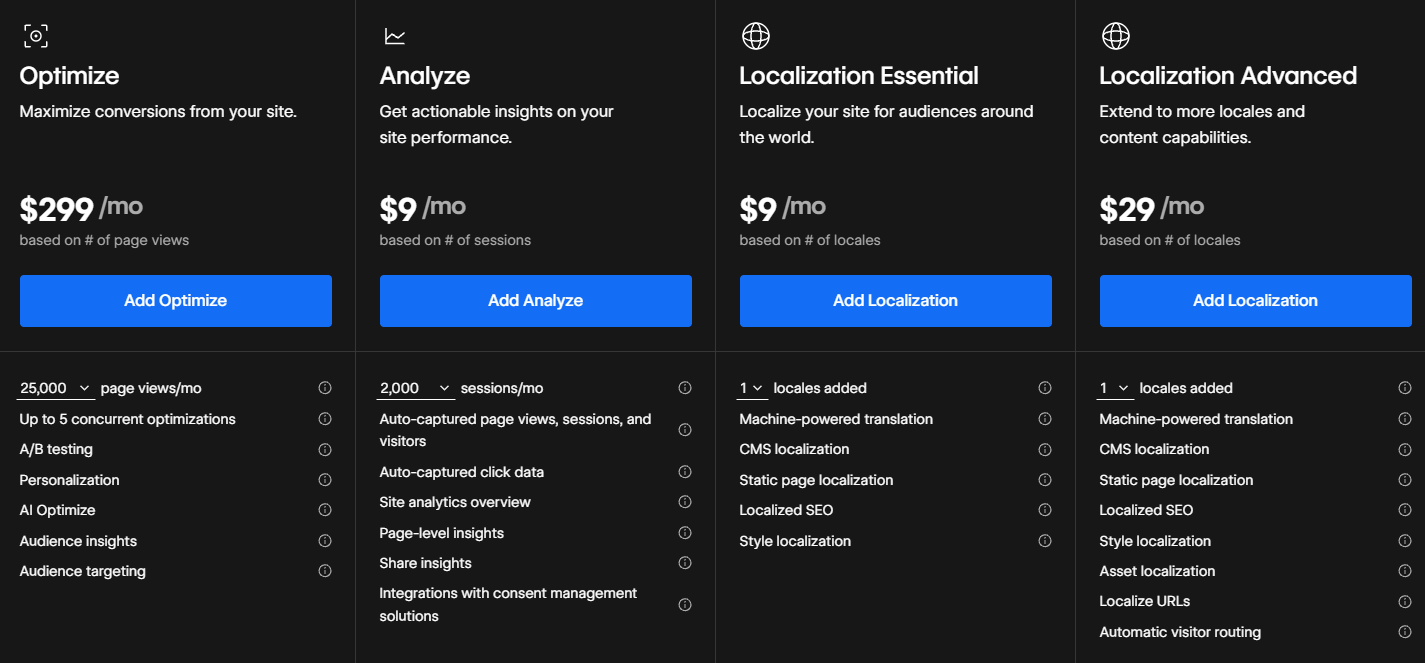
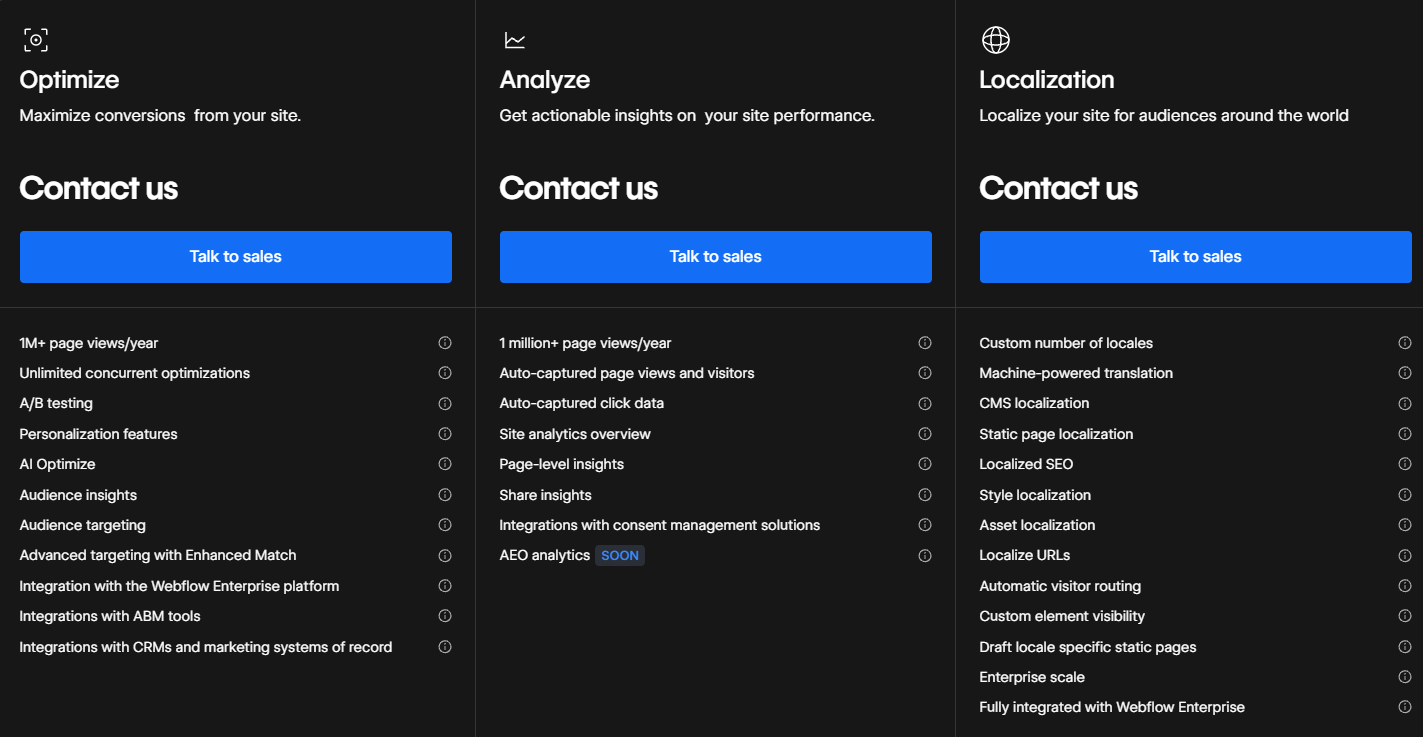
Webflow Optimize
Webflow Optimize is an AI-powered add-on designed to enhance your website's performance through A/B testing and personalized user experiences.
It empowers you to conduct experiments and deliver personalized content without extensive coding or reliance on developer resources. By leveraging AI-driven insights, you can identify which variations of your site content resonate most with different audience segments, allowing for data-informed decisions to enhance user engagement and drive conversions.
For Site Plans
Price: $299/mo (annual), $379/mo (monthly) — usage-based, starting at 25,000 page views/mo [1]
Features [1]:
- Up to 5 concurrent optimizations
- A/B testing
- Personalization
- AI Optimize
- Audience insights
- Audience targeting
Ideal for: Individuals and small teams initiating their optimization efforts.
For Enterprise
Price: Custom — contact Webflow sales [1]
Features [1]:
- 1M+ page views/year
- Unlimited concurrent optimizations
- A/B testing
- Personalization
- AI Optimize
- Audience insights
- Audience targeting
- Advanced targeting with Enhanced Match
- Integration with the Webflow Enterprise platform
- Integrations with ABM tools
- Integrations with CRMs and marketing systems of record
Ideal for: Businesses aiming to build and scale comprehensive optimization programs.
Webflow Analyze
Webflow Analyze is a native analytics tool that provides designers and content marketers with a unified view of visitor behavior directly within the Webflow platform. This integration enables users to make data-driven decisions to enhance site performance without relying on complex third-party analytics tools [7].
Key features [7]:
- Site overview — insights into overall site traffic and key performance metrics, such as the most-viewed pages and the number of unique site visitors, all accessible within Webflow
- Page insights — visitor interactions on specific pages, including which elements receive the most clicks and the subsequent pages users navigate to
- Clickmaps and scrollmaps — visual overlays showing exactly where visitors click and how far they scroll on each page
- Custom goal tracking — define and track specific conversion actions (e.g. "Request a demo") without code
- Audience segmentation — filter data by device type, language, location, and referral source
- Effortless, code-free setup — one-click activation with automatic event tracking; no manual configuration or coding required
- Privacy-focused — cookie-free tracking; data stays within the Webflow ecosystem. For consent management, integrates with DataGrail and Finsweet Components
For Site Plans
Price: $9/mo (annual), $12/mo (monthly) — usage-based, starting at 2,000 sessions/mo [1]
Features [1]:
- Auto-captured page views, sessions, and visitors
- Auto-captured click data
- Site analytics overview
- Page-level insights
- Share insights
- Integrations with consent management solutions
Available on Basic, Premium, and Ecommerce site plans [1].
Ideal for: Marketing and design teams who want on-page behavioral data — clicks, traffic sources, page performance — without adding a third-party analytics tool.
For Enterprise
Price: Custom — contact Webflow sales [1]
Features [1]:
- 1 million+ page views/year
- Auto-captured page views and visitors
- Auto-captured click data
- Site analytics overview
- Page-level insights
- Share insights
- Integrations with consent management solutions
- AEO analytics (coming soon)
Ideal for: Enterprise teams needing high-volume site analytics with AEO tracking to measure visibility in AI-driven search results.
Webflow Localization
Webflow offers a free preview of basic Localization functionalities across all Site plans, allowing users to explore features such as machine-powered translation and static page, CMS, and SEO localization. To publish your site in multiple languages or add more than one secondary locale, you'll need to purchase a Localization add-on [8].
Webflow Localization enables businesses to tailor their websites for a global audience by providing tools to customize content, design, and SEO for multiple languages and regions [8].
Key features [8]:
- Visual customization — design and adjust your site's content and styles for each target locale directly within Webflow Designer, without the need for coding
- Translation options — utilize native machine-powered translation or integrate with your preferred Translation Management System (TMS) such as Smartling, Lokalise, Phrase, or Transperfect
- SEO — enhance organic traffic by implementing localized meta titles, descriptions, hreflang tags, and auto-generated sitemaps for each locale
Note: The Team plan includes 2 locales as standard [1].
For Site Plans
Note: A free localization preview is available on all plans; you only pay when you publish [1]. The Team plan includes 2 locales as standard [1].
Localization Essential
Price: $9/mo per locale (annual), $12/mo per locale (monthly) [1]
- Up to 3 additional locales [1]
- 10,000 words/locale/month machine translation [1]
Features [1]:
- Machine-powered translation
- CMS localization
- Static page localization
- Localized SEO
- Style localization
Ideal for: Teams adding 1–3 language versions with moderate content volume.
Localization Advanced
Price: $29/mo per locale (annual), $35/mo per locale (monthly) [1]
- Up to 10 additional locales [1]
- 50,000 words/locale/month machine translation [1]
Everything in Essential, plus [1]:
- Asset localization
- Localize URLs
- Automatic visitor routing
Ideal for: Teams expanding into 4–10 markets, or those who need localized URLs and automatic language-based visitor routing.
For Enterprise
Price: Custom — contact Webflow sales [1]
Features [1]:
- Custom number of locales
- Machine-powered translation
- CMS localization
- Static page localization
- Localized SEO
- Style localization
- Asset localization
- Localize URLs
- Automatic visitor routing
- Custom element visibility
- Draft locale-specific static pages
- Enterprise scale
Example: Adding German and French to an English site = 2 additional locales. Essential: 2 x $9 = $18/mo (annual) [1].
Note: Localization add-ons are supplementary to your existing Site plan subscription [1].
What Webflow Pricing Looks Like in Practice
The number on the pricing page is rarely what you actually pay. Here's what different user types realistically spend per month. All prices below reflect annual billing; monthly billing rates are higher [1].
Solo marketer or founder managing one site
Basic Site Plan ($15/mo, annual) [1] + Starter Workspace (free) [1] Total: ~$15/mo (annual) or ~$25/mo (monthly)
Works for a simple marketing site with no CMS needs. If you need blog posts or dynamic content, add Premium.
Small marketing team (2-3 people, content-heavy site)
Premium Site Plan ($25/mo, annual) [1] + Core Workspace ($19/mo, annual) [1] + 1 additional Limited Seat ($15/mo, annual) [1] Total: ~$59/mo (annual)
Covers a content team managing a blog, CMS, and basic collaboration.
Mid-size marketing team (4-6 people, multiple sites)
Premium Site Plan ($25/mo, annual) [1] + Growth Workspace ($49/mo, annual) [1] + 3 additional Full Seats ($117/mo, annual) [1] Total: ~$191/mo (annual)
This is where the seat model starts to matter. Three extra full seats add $117/mo [1]. If some team members only need content editing access, switch them to Limited Seats ($15/mo each, annual) [1] to cut costs.
Growing team that's outgrown self-serve
Team Plan Total: $2,500/mo (annual commitment) [1]
The Team plan bundles the site, 5 full seats + 5 limited seats, 2 locales, and workflow features [2]. It costs significantly more than self-serve plans, but includes capabilities that don't exist on self-serve at any price: page branching, publishing workflows, and 100 CMS Collections [1].
Ecommerce store (growing, mid-range)
Plus Ecommerce Plan ($74/mo, annual) [1] + Freelancer Workspace ($16/mo, annual) [1] Total: ~$90/mo (annual)
Good for a store doing $5K+ in monthly sales where the 2% transaction fee on Standard no longer makes sense.
Hidden Costs to Budget For
Webflow's plan price doesn't cover everything you'll need to launch a real site. These are the extras most people don't account for upfront.
Custom domain: Not included in any Webflow plan [1]. You buy it separately through Webflow's domain registrar or a third party. Domain registration is a separate annual cost — the exact price depends on your registrar and TLD.
Premium templates: Webflow offers free and paid templates. Paid templates are a one-time purchase — check webflow.com/templates for current prices. Factor this in if you're not starting from scratch.
Code export + external hosting: If you want to export your site's code and host it elsewhere, you need at least a Core Workspace plan [1]. Add external hosting costs on top of that.
Annual billing discount: Switching from monthly to annual billing saves 18–40% depending on the plan [1]. The Basic plan, for example, goes from $25/mo (monthly) to $15/mo (annual) [1]. That's $120/year saved on one plan alone.
Seat costs at scale: Each additional full seat is $39/mo [1]. For a 10-person team all needing design access, that's $390/mo in seats alone, before the site plan
Transaction Fee Breakeven for Ecommerce
The Standard ecommerce plan charges a 2% Webflow transaction fee on every sale [1]. The Plus plan has no transaction fee but costs $45/mo more (annual pricing) [1].
The breakeven point: $2,250/mo in monthly sales.
At $2,250/mo in sales, the 2% fee on Standard = $45. That's exactly what Plus costs more per month [1]. Above $2,250/mo, Plus saves you money on every dollar of sales.
| Monthly Sales | Standard (2% fee) [1] | Plus (0% fee) [1] | Monthly Savings with Plus |
|---|---|---|---|
| $1,000 | $20 in fees | $0 | Plus costs $25 more net. Not worth it yet. |
| $2,250 | $45 in fees | $0 | Exactly break even. |
| $5,000 | $100 in fees | $0 | You save $55/mo net. |
| $10,000 | $200 in fees | $0 | You save $155/mo net. |
If your store is already doing $2,500/mo in sales, do the math. Plus will pay for itself within the first month.
How to Choose the Right Webflow Pricing Plan
Choosing the right Webflow pricing plan is crucial for ensuring your website and workflow align with your business needs. Whether you're a solo entrepreneur, a growing team, or a large enterprise, the right combination of Site Plans and Workspace Plans can streamline your operations and maximize efficiency.
Step 1: Understand What You Need From a Website
The first thing to clarify is your website's purpose. Ask yourself:
- Do I need a simple informational website? (e.g., portfolio, landing page, small business site)
- Am I running a blog or content-heavy website? (e.g., magazine, news site, educational resource)
- Will I be selling products online? (Ecommerce store)
- Is my site expected to handle high traffic? (e.g., large business, SaaS company, a startup with rapid growth)
- Do I need team collaboration, or will I manage the site alone?
Once you've answered these questions, choosing the Site Plan becomes easier.
Step 2: Pick the Right Site Plan for Hosting Your Website
- Basic Site Plan is best for simple websites (landing pages, small business sites) with no CMS features.
- Premium Site Plan is ideal for blogs, content-heavy sites, and businesses that need to update pages dynamically. It replaces the old CMS and Business plans as of May 2026.
- Team Plan is for growing marketing teams that need publishing workflows, page branching, multi-seat collaboration, and enterprise-grade controls — without a full custom contract.
- Enterprise is for large organizations with advanced governance, security, and compliance requirements.
- Ecommerce Standard Plan is for small stores with up to 500 ecommerce items.
- Ecommerce Plus Plan is for growing businesses handling up to 5,000 ecommerce items.
- Ecommerce Advanced Plan is for high-volume stores requiring maximum scalability — up to 15,000 items.
Pro tip: If you're planning to scale your business or grow your content library, avoid the Basic plan. It lacks a CMS, meaning you'll have to manually edit static pages every time you need an update.
Step 3: Pick the Right Workspace Plan for Managing Your Webflow Projects
If you're working alone, a Site Plan might be all you need. But if you manage multiple sites or collaborate with a team, a Workspace Plan can significantly improve your workflow.
- Starter Workspace Plan is for solo users testing Webflow. Limited to 2 staging sites.
- Core / Freelancer Plans are for freelancers and small teams working on multiple projects with basic staging capabilities.
- Growth / Agency Plans are for agencies and larger teams managing multiple sites, requiring advanced collaboration and permissions.
- Enterprise (Custom) is for large organizations needing security, dedicated support, and custom workflows.
Pro tip: If you're a freelancer working alone but handling multiple client projects, consider Webflow Freelancer plan. It allows you to manage up to 10 staging sites without needing a Site Plan for each until they're ready for launch.
Step 4: Do You Need Both a Site Plan and a Workspace Plan?
- If you only need to host one website, just get a Site Plan (it comes with a free Workspace plan by default).
- If you work with multiple projects and collaborate with a team, get a paid Workspace Plan.
- If you run an agency or business with a website and multiple projects, get both to manage your site and streamline your workflow.
What we recommend for solo entrepreneurs and small businesses:
- Premium Site Plan — if you manage a blog or need dynamic content
- Basic Site Plan — for static sites like landing pages
- Core Workspace Plan — if you're handling multiple projects
What we recommend for startups and growing teams:
- Premium Site Plan — if self-serve is enough: a scaling marketing site with CMS needs
- Team Plan — if you need publishing workflows, page branching, and multi-seat collaboration
- Growth Workspace Plan — for managing multiple websites and staging environments (if on Premium)
What we recommend for agencies and large enterprises:
- Enterprise Site Plan — for custom security, compliance, and dedicated support
- Agency or Enterprise Workspace Plan — for advanced team management, permissions, and collaboration
Common Mistakes to Avoid
People make the same four mistakes when choosing Webflow plans.
Choosing the cheapest plan without checking what it's missing. The Starter plan looks free until you realize you can't connect a custom domain [1]. The Basic plan looks affordable until you realize it has no CMS [1]. Read the feature list before committing.
Skipping the Workspace Plan when managing multiple sites. A Site Plan alone doesn't give you a working environment for building. If you're managing more than one project, or you need staging sites, you need a Workspace Plan [1].
Assuming non-Ecommerce plans support product sales. They don't. You cannot add a shopping cart to a Premium plan [1]. Ecommerce requires an Ecommerce site plan.
Not planning for seat costs. The plan price is just the starting point. A five-person team with full seat access adds $156/mo in additional seat costs alone — before workspace and site plan costs [1]. Budget for seats early, and consider Limited Seats for content editors who don't need design access [1].
{{post-cta}}
Final Thoughts
Webflow's pricing structure might seem complex at first, but once you understand what each plan offers and match it to your needs, it becomes clear. If you're unsure, start with the Basic Site Plan — it's the most affordable paid option and you can always upgrade to Premium when you need CMS or dynamic content.
FAQ – Webflow Pricing Breakdown
How much does Webflow cost?
Site Plans: Basic $15/mo (annual) / $25/mo (monthly), Premium $25/mo (annual) / $39/mo (monthly) [1]. Ecommerce: Standard $29/$42, Plus $74/$84, Advanced $212/$235 [1]. Workspace plans: Core $19/$28, Freelancer $16/$24, Growth $49/$60 [1]. Team platform plan: $2,500/mo on an annual contract [1].
Do I need a Workspace Plan to use Webflow?
No, paid Workspace Plans are only needed if you collaborate with a team or manage multiple projects. If you just want to host a single website, a Site Plan is sufficient. A free Starter Workspace comes with every account by default [1].
Can I use Webflow for free?
Yes. The Webflow free plan (Starter) lets you build and publish on a webflow.io subdomain. A paid Site Plan starting at $15/mo is required to connect a custom domain. The Starter Workspace is also free, capped at 2 staging sites [1].
Can I sell products on Webflow without an Ecommerce Plan?
No. Ecommerce functionality — checkout, cart, and transactions — is only available on Ecommerce Site Plans, starting at $29/mo for the Standard plan [1]. You cannot add a shopping cart to a regular Site Plan.
Can I switch between Webflow pricing plans?
Yes. You can upgrade or downgrade your Site Plan or Workspace Plan at any time [2]. If you're on legacy CMS or Business pricing, the transition to Premium takes effect on June 29, 2026, or at your next renewal, whichever comes first [2][3].
Does Webflow charge transaction fees for Ecommerce sites?
Only on the Standard Ecommerce plan: 2% per transaction [1]. The Plus and Advanced Ecommerce plans have no Webflow transaction fees [1]. Payment processor fees (Stripe, etc.) apply regardless of plan.
Can I export my Webflow site's code?
Yes, but code export is only available with paid Workspace plans at Core tier or above [1]. It is not available on the free Starter Workspace plan.
Is Webflow good for SEO?
Yes. Webflow includes built-in SEO tools: custom meta tags, structured data support, clean semantic HTML, automatic sitemaps with hreflang, 301 redirects, robots.txt and LLMs.txt management, and fast-loading pages via global CDN [1].
How much does Webflow hosting cost?
Webflow hosting is included in every Site Plan — there is no separate hosting fee. Basic starts at $15/mo (annual) / $25/mo (monthly), Premium at $25/mo (annual) / $39/mo (monthly) [1]. Each plan covers SSL, global CDN delivery, and uptime per site.
Is Webflow good for agencies?
Yes. Webflow offers dedicated Freelancer ($16/mo annual) and Agency Workspace plans built for client work — with site transfer capability, free client guest access, and staging environments [1]. Most agencies pair a Workspace plan with individual Site Plans per client site.
Sources
- Webflow Pricing Page (fetched May 21, 2026): https://webflow.com/pricing
- Webflow Blog: "We're updating our pricing and simplifying our plans at the same time" (May 2026): https://webflow.com/blog/simplified-plans-and-updated-pricing-2026
- Webflow Help Center: "Updated pricing and simplified plans for May 2026": https://help.webflow.com/hc/en-us/articles/51059955082387-Updated-pricing-and-simplified-plans-for-May-2026
- Webflow Community: "Updates to Webflow Plans and Pricing": https://community.webflow.com/updates/post/updates-to-webflow-plans-and-pricing-mmTMW66ihrRXZ0o
- Webflow Pricing Change Calculator: https://webflow.com/pricing/calculator
- Webflow Feature: Optimize: https://webflow.com/feature/optimize
- Webflow Feature: Analyze: https://webflow.com/feature/analyze
- Webflow Feature: Localization: https://webflow.com/feature/localization








.avif)